How to Choose Hosting Based on Website Storage
Knowing how to choose hosting based on website storage keeps you from either running out of space mid-project or paying for capacity you’ll never touch. Storage needs vary far more by content type than by site size alone.
This guide breaks down how much storage different kinds of websites actually need, using Hostinger‘s plans as a real example. Match your content type to the tiers below.
Disclosure: HostingPlanGuide earns a commission if you buy through our links, at no extra cost to you. We still note where a plan’s storage may fall short, so you can decide with the full picture.
Quick Answer: How Much Storage Do You Need?
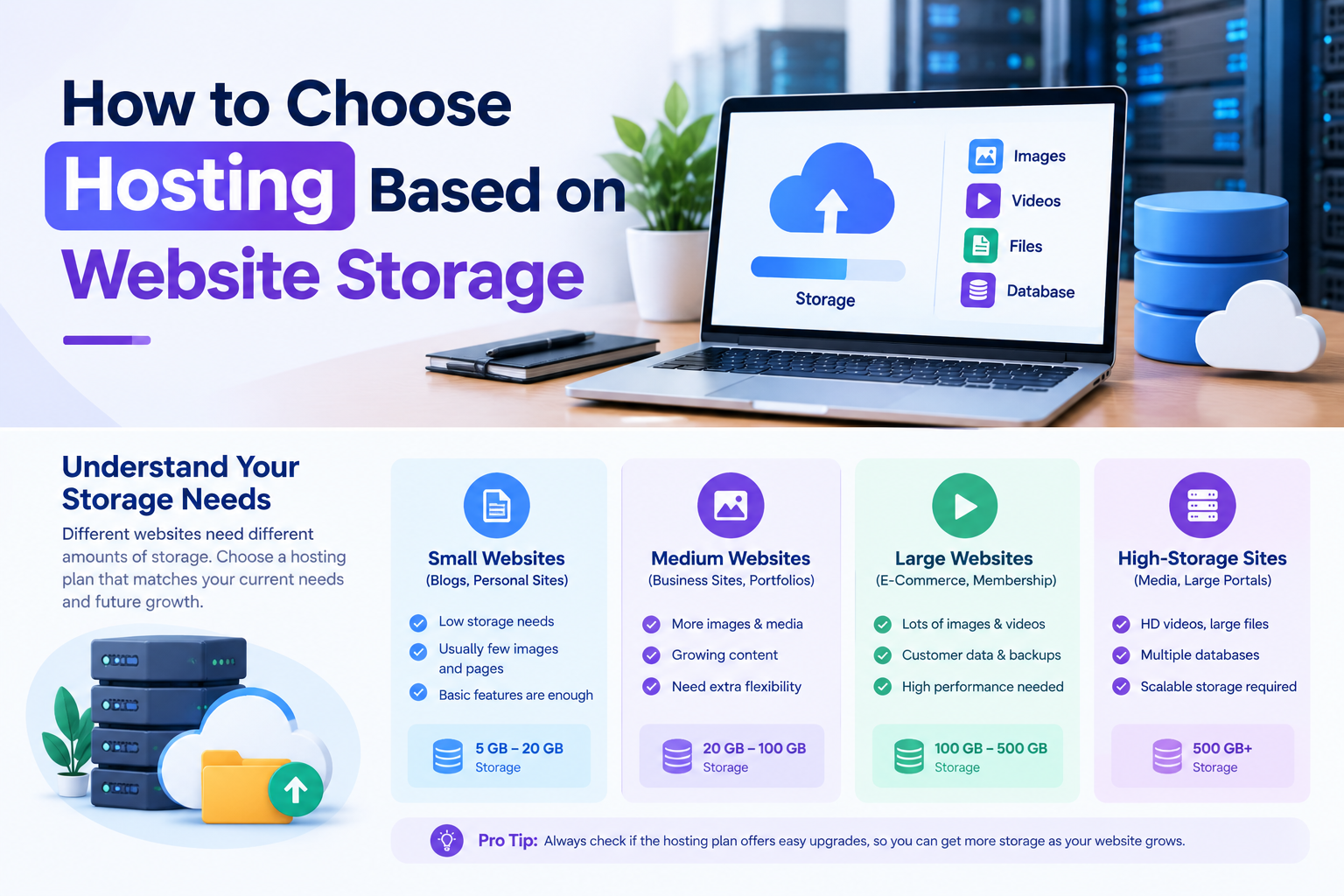
A text-based blog rarely needs more than a few GB. A site with regular photos or a small store fits comfortably in 10 to 20 GB. Media-heavy sites, large stores, or multiple websites on one account benefit from 50 GB or more.
Website Storage Needs by Content Type
| Site Type | Typical Storage Need | Hostinger Example | Starting Price |
|---|---|---|---|
| Text blog, portfolio | 1–5 GB | Premium (20 GB SSD) | $2.99/mo |
| Photo-heavy blog, small business site | 5–15 GB | Premium (20 GB SSD) | $2.99/mo |
| Small online store | 15–40 GB | Unlimited (50 GB NVMe) | $3.99/mo |
| Multiple sites, video, large catalogs | 50 GB+ | Unlimited or Cloud Startup | $3.99/mo and up |
Storage estimates are general guidelines, not exact figures. Hostinger prices from its pricing page, September 2026, for 48-month terms, excluding VAT.

What Actually Uses Up Storage on a Website
Storage adds up faster than most beginners expect. Here’s what typically takes up the most space on a hosting account.
- Images and media. Uncompressed photos and video are usually the single biggest storage user on a website.
- Your database. Every post, comment, and setting lives here. It grows slowly but steadily over time.
- Plugins and themes. Each one adds its own files, and unused ones still take up space.
- Email storage. If your hosting plan includes mailboxes, attachments and messages count against your storage too.
- Backups. Some hosts store backup copies within your account’s own storage allowance, so check whether yours does.
Storage by Site Type
Text-Based Blogs and Portfolios
A blog built mostly around written posts uses very little space. Even a few hundred articles, with modest featured images, typically fit within just a few GB.
Hostinger’s Premium plan offers 20 GB of SSD storage, which leaves plenty of room to grow well beyond a typical blog’s needs.
Photo-Heavy Sites and Small Businesses
A photography portfolio, a restaurant site with a full menu gallery, or a local business site with lots of images uses noticeably more space than a text blog.
Compressing images before upload makes a real difference here. Even so, Premium’s 20 GB usually covers this kind of site comfortably for years.

Online Stores
Every product needs at least one image, often several, plus descriptions and variant data stored in your database. A store with a few hundred products can use up storage faster than a blog with thousands of posts.
Hostinger’s Unlimited plan steps up to 50 GB of NVMe storage, which suits most small to mid-sized stores. A large catalog with hundreds of high-resolution product photos may need cloud hosting instead.
Multiple Websites on One Account
If you run several small sites under one hosting account, their storage needs add together. A handful of blogs might still fit within 20 GB, but adding stores or media-heavy sites to the mix changes the math.
Hostinger’s Unlimited plan removes the website cap, which helps here, but the 50 GB storage limit still applies across every site combined.
SSD vs. NVMe: Does Storage Type Matter?
Storage type affects speed, not just capacity. SSD storage is faster than older hard drives, and NVMe storage is a newer, faster standard still.
Hostinger’s Premium plan runs on SSD storage, while its Unlimited plan uses NVMe. If your site loads a lot of media per page, the faster storage type can noticeably improve load times, on top of the extra space.
Signs You Need More Storage
- You get a storage warning email from your host telling you that you’re near your limit.
- Uploads start failing in your WordPress media library with no clear error.
- Your site is approaching the plan’s stated cap when you check usage in hPanel or your control panel.
- You’re planning new features like video, a store, or a second site that will add meaningfully to your usage.
If any of these sound familiar, it’s usually cheaper and simpler to upgrade your plan than to spend hours trimming existing content.
Tips to Use Your Storage Efficiently
- Compress images before upload. This is the single biggest lever for most sites.
- Use an external video host. Hosting video files yourself uses storage fast; a platform like YouTube keeps your own storage free.
- Clean up unused plugins and themes. Deactivated does not mean deleted, and old files still count.
- Check your database size periodically. Old revisions and spam comments can quietly add up.
- Review your backup settings. Confirm whether your host counts backups against your storage allowance.
Not sure which overall plan fits your project? See our guide to the best cheap hosting for a new website for a full plan comparison.
People Also Ask: How to Choose Hosting Based on Website Storage
How much storage does a small website actually need?
Most small text-based websites need only a few GB, even with hundreds of posts. Sites with more images or an online store typically need somewhere between 10 and 40 GB, depending on the amount of media involved.
Is 10 GB of storage enough for a WordPress site?
For a text-focused blog or small business site, yes, 10 GB is usually plenty. Sites with heavy image galleries or a growing product catalog may outgrow it sooner.
Does hosting an online store need more storage than a blog?
Generally yes. Product images, variant data, and order records add up faster than typical blog content, especially as your catalog grows.
What happens if my website runs out of storage?
Uploads and updates can start failing, and in some cases your site may stop working correctly until you free up space or upgrade. Most hosts warn you before you reach your limit.
Should I host videos on my website’s own storage?
Usually not. Hosting video files directly can use up storage and bandwidth quickly. Uploading to a platform like YouTube and embedding the video is generally more efficient.
Can I upgrade my storage later without moving my site?
Yes, on most hosts, including Hostinger, you can upgrade to a higher-storage plan through your control panel without migrating to a new host.
Final Verdict: How to Choose Hosting Based on Website Storage
Match your storage tier to your content type, not just a general sense of your site’s size. Text blogs need very little, photo-heavy sites and small stores need a moderate amount, and multiple sites or large catalogs need the most.
Hostinger’s Premium plan covers most blogs and small business sites comfortably, while its Unlimited plan’s 50 GB of NVMe storage suits growing stores and media-heavy projects. Either way, compress your images and clean up unused files to make the most of the space you have.