Best Hosting for a Website With Low Traffic in 2026
Not every website needs to handle thousands of visitors a day, and that’s genuinely fine. A family site, a local club page, a hobby blog, or a project you’re still testing all fall into low-traffic territory, and paying for infrastructure built to handle a traffic spike you’ll likely never see is money spent solving a problem you don’t have. Finding the best hosting for a low-traffic site is really about not overpaying, not about finding the fastest possible server.
Below, we cover what actually counts as “low traffic,” why basic shared hosting is almost always the right fit at this level, and which providers deliver the most reliable low-cost option. If your site is growing past this stage, our guide on how much storage and bandwidth a small site needs covers the next size up. You’ll also find answers to the questions people ask most at this traffic level.
What Actually Counts as “Low Traffic”?
There’s no single official cutoff, but a useful working definition is a site seeing under a few thousand visitors a month, with no more than a handful of people browsing at the exact same moment. For context, independent testing from TechRadar notes that shared servers commonly handle up to around 10,000 monthly visits before performance starts to strain, so a low-traffic site is operating well within that ceiling with room to spare.
If that describes your site, the good news is you genuinely don’t need to spend much to host it well. The goal here is finding a host that’s reliable and won’t nickel-and-dime you, not one built for scale you don’t need yet.
Why Basic Shared Hosting Is Almost Always the Right Call
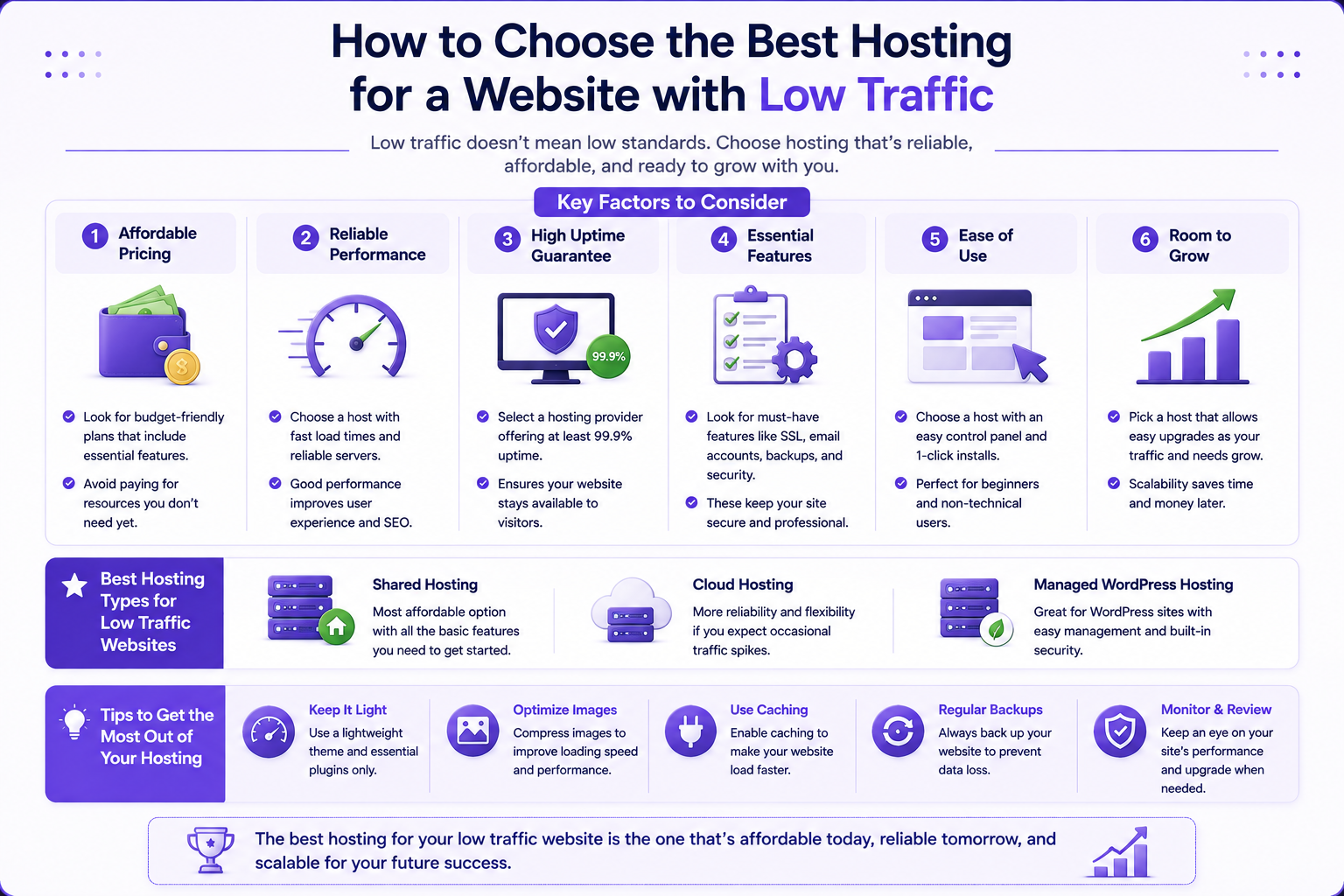
Shared hosting was essentially built for exactly this scenario: a site that doesn’t need dedicated resources but still needs to be reliably online. At low traffic levels, VPS or cloud hosting add cost without adding any real benefit, since you’d be paying for headroom you’re not using. Save that upgrade for when your traffic actually grows into needing it.
The one thing worth prioritizing even at this traffic level is a free SSL certificate and basic security features, since those matter regardless of how many visitors you get. Beyond that, focus on price and reliability over raw performance specs you won’t come close to needing.

Best Low-Cost Hosting for Low-Traffic Sites: Comparison
| Provider | Starting Price | Best For |
|---|---|---|
| Hostinger | $2.69/mo | Best overall value at this traffic level |
| Bluehost | $2.95/mo | Simple, non-technical setup |
| DreamHost | $2.89/mo | Very low per-site cost across multiple sites |
| IONOS | $1.00/mo (intro) | Absolute lowest entry price |
*Promotional pricing on long-term plans; renewal rates are higher. Always confirm current pricing at checkout before purchasing.
Why Hostinger Fits Low-Traffic Sites Well
Hostinger’s entry-level Premium plan is a strong fit for a low-traffic site specifically because it doesn’t skimp on the basics to hit a low price. It includes 20 GB of SSD storage, support for multiple websites, unmetered traffic, and a free domain for the first year, all comfortably more than a low-traffic site will ever use, at a price that still stays under a few dollars a month on a long-term plan.
A few reasons this works well specifically at low traffic levels:
- You’re not paying extra for performance headroom you don’t need yet, keeping cost proportional to actual use.
- Free SSL and basic security are included by default, so you’re not skipping protection just because the site is small.
- A simple upgrade path exists if the site unexpectedly grows, so choosing a budget plan now doesn’t box you in later.
- 24/7 support is included even at this price point, useful if you’re not particularly technical and something goes wrong.
Signs Your “Low Traffic” Site Isn’t Anymore
Keep an eye out for a few signals that suggest it’s time to size up:
- You’re consistently seeing more than a handful of simultaneous visitors, particularly during specific times of day.
- Load times noticeably slow down during your busier periods, not just occasionally.
- You’ve added functionality, like an online store or a membership area, that puts more load on the server per visitor than a simple content page does.
None of these mean you overpaid by starting cheap. They just mean your site outgrew its original bracket, which is a good problem to have.
People Also Ask
What is the best hosting for a low-traffic website?
Hostinger is generally the best choice for a low-traffic website in 2026, offering more than enough storage and features at a price well under $3 a month on a long-term plan. Bluehost, DreamHost, and IONOS are all solid alternatives at a similar price point.
How much traffic can shared hosting actually handle?
Most shared hosting plans comfortably handle up to around 10,000 monthly visits before performance starts to strain, though this varies by host and how the site itself is built. A low-traffic site operates well within that range.
Should I use free hosting if my site barely gets any visitors?
Generally not recommended. Free hosting typically comes with a subdomain instead of your own domain, ads you can’t control, and limited support. A low-cost paid plan costs very little more and avoids those trade-offs entirely.
Is it a waste of money to buy a bigger hosting plan than I need?
Yes, generally. Paying for VPS or cloud-level resources on a site that gets minimal traffic means paying for headroom you’re not using. It’s more cost-effective to start small and upgrade only once your traffic actually justifies it.
Does low traffic mean I don’t need to worry about site speed?
Not entirely. Even a low-traffic site benefits from reasonable load times for the visitors it does get, and speed still factors into search rankings. It just means you don’t need premium, high-performance infrastructure to achieve that at this traffic level.
Final Takeaway
A low-traffic website doesn’t need premium infrastructure, it needs a reliable, affordable host that covers the basics without overselling you on capacity you’ll never use. Hostinger hits that balance well, delivering more storage and features than a low-traffic site will realistically need at a genuinely low price. Keep an eye on the signs your traffic is growing, and upgrade when the data actually calls for it, not before.
