Best Hosting for a Website Expecting Rapid Growth (2026 Guide)
If your traffic chart is starting to point up and to the right, your hosting plan is one of the first things that will get tested. The best hosting for a website expecting rapid growth isn’t necessarily the cheapest plan or the one with the flashiest ad — it’s the one that can add CPU, RAM, and bandwidth on demand without forcing you to migrate everything at 2 a.m. during a traffic spike. Below, we break down the providers, plans, and features that actually hold up when a site goes from a few hundred visitors a day to tens of thousands.
Why Your Hosting Choice Matters More During Growth Phases
A slow site or unexpected downtime is costly at any stage, but it’s especially damaging when you’re finally getting noticed. A viral post, a product launch, or a seasonal spike can send your visitor count up by 5–10x in a single day. Standard shared hosting plans, which are usually capped at a fixed number of monthly hits, tend to buckle under that kind of load. Meanwhile, hosts built around cloud infrastructure or dedicated resources are designed to absorb the surge, keep pages loading fast, and protect your search rankings, since Google’s Core Web Vitals scores drop quickly when servers get overloaded.
Comparison Table: Best Hosting for a Website Expecting Rapid Growth
| Host | Best For | Scaling Model | Starting Price | Support |
|---|---|---|---|---|
| Hostinger Cloud | Best value for growing sites | Instant plan upgrades, dedicated resources | $7.99/mo | 24/7 live chat, AI assistant |
| Cloudways | Developers wanting public-cloud flexibility | Vertical resizing on AWS/GCP/DigitalOcean | ~$11/mo | 24/7 managed support (paid tiers) |
| Kinsta | Premium managed WordPress at scale | Google Cloud auto-scaling | ~$35/mo | 24/7 expert support |
| IONOS | Budget-friendly enterprise scaling | Flexible cloud resource scaling | ~$1/mo intro | 24/7 support |
| InMotion Hosting | Agencies and mission-critical sites | VPS → dedicated → private cloud, no replatforming | ~$4.59/mo | 24/7 in-house human support |
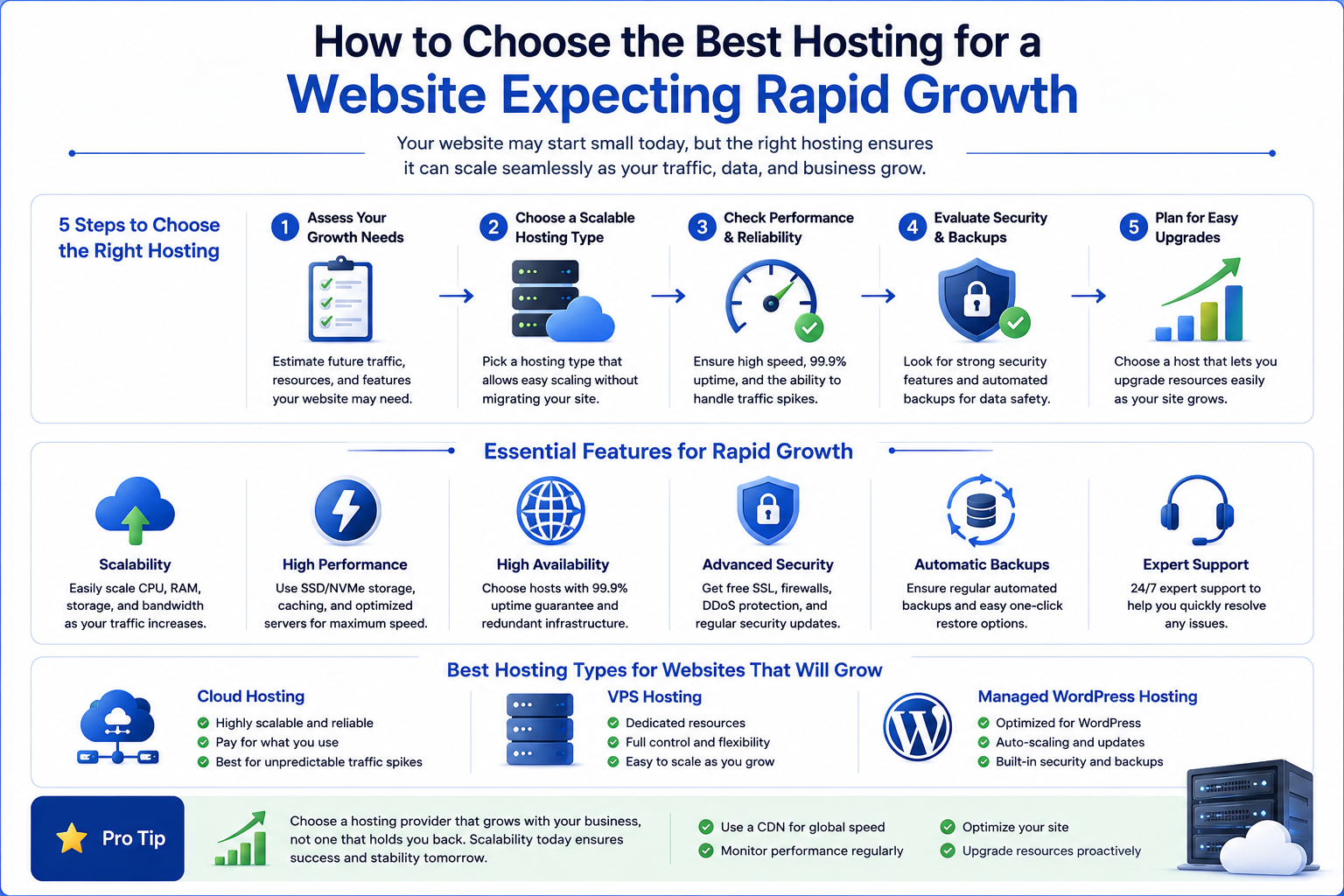
The Top Hosts for a Fast-Growing Website, Explained
1. Hostinger Cloud Hosting — Best Overall Value
Hostinger’s Cloud plans start at around $7.99/month on the Cloud Startup tier, which includes 4 vCPU cores, 4 GB RAM, 100 GB NVMe storage, and up to 100 PHP workers — enough headroom for most sites moving past the shared-hosting stage. As traffic keeps climbing, upgrading to Cloud Professional or Cloud Enterprise takes a few clicks inside hPanel, with no downtime migration required. It’s a practical pick if you want cloud-level performance without the steep learning curve of a fully self-managed platform.
2. Cloudways — Best for Developers
Cloudways sits on top of major public clouds like AWS, Google Cloud, and DigitalOcean, letting you resize server resources with a slider rather than a full replatform. It’s a strong fit if your team is comfortable managing performance settings themselves and wants the flexibility of choosing the underlying cloud provider.
3. Kinsta — Best Premium Managed Option
Built on Google Cloud’s infrastructure, Kinsta automatically distributes load and adds resources during spikes, which makes it popular with larger WordPress publishers and stores that can’t afford downtime. The trade-off is price — plans typically start around $35/month, aimed at sites that have already outgrown budget hosting.
4. IONOS — Best for Scaling on a Budget
IONOS is frequently ranked among the best hosts for scalability thanks to low entry pricing combined with flexible cloud resource allocation, making it a solid option for teams that expect growth but don’t want to overcommit early on.
5. InMotion Hosting — Best for Agencies and Mission-Critical Sites
InMotion runs on owned bare-metal infrastructure and lets you move between VPS, dedicated, and private cloud tiers without rebuilding your stack, backed by 24/7 in-house human support — a good match for agencies managing several growing client sites at once.

Key Features to Look for When Choosing Growth-Ready Hosting
- Auto-scaling or one-click upgrades: Your host should let you add CPU, RAM, or bandwidth without a full site migration.
- Dedicated resources: Shared hosting throttles you when neighboring sites spike; cloud and VPS plans isolate your resources.
- Built-in CDN and caching: A global CDN and object caching keep load times low even when visitors are spread across regions.
- Uptime guarantee with credits: Look for a documented SLA (99.9% or better), not just a marketing claim.
- Headroom in PHP workers: More PHP workers mean more simultaneous requests handled without queuing.
- Responsive support: During a traffic surge, slow support tickets can cost you sales and rankings — prioritize hosts with 24/7 live chat.
Signs Your Current Host Can’t Keep Up
If you’re seeing slower Time to First Byte scores, more frequent 502/503 errors during traffic peaks, or your host is asking you to upgrade to “resolve resource limits,” that’s usually a sign you’ve outgrown your current plan. Catching this before a major spike — rather than during one — gives you time to migrate calmly and test performance ahead of time.

People Also Ask
What is the best type of hosting for a fast-growing website?
Cloud hosting is generally the best fit, since it separates your resources from other sites and lets you scale CPU, RAM, and storage on demand rather than migrating servers entirely.
Is cloud hosting better than shared hosting for scaling?
Yes, in most cases. Shared hosting plans usually cap monthly traffic and share server resources with other accounts, while cloud hosting isolates your resources and allows incremental upgrades as traffic grows.
How much does scalable hosting cost?
Entry-level cloud plans typically start around $7–$10 a month, with mid-tier plans for growing traffic in the $15–$30 range, and enterprise-grade cloud or dedicated hosting running $60 or more per month.
Can I upgrade my hosting plan without downtime?
With most cloud hosts, yes — resource upgrades like adding RAM or CPU cores can typically be applied without taking your site offline, though a full migration to a different hosting type may require brief downtime.
When should I move from shared hosting to cloud hosting?
Once you’re consistently approaching your plan’s monthly visit limit, seeing slower load times during peak hours, or planning a launch or campaign expected to drive a traffic spike, it’s a good time to move to a cloud or VPS plan.
Final Verdict
For most site owners anticipating rapid growth, Hostinger Cloud Hosting offers the best balance of price, dedicated resources, and simple upgrade paths. Developers who want more control over infrastructure should look at Cloudways, while larger publishers and stores with bigger budgets will get the most reliability from Kinsta or InMotion Hosting. Whichever you choose, prioritize a host that lets you scale up in place — the goal is to spend your energy on the growth itself, not on migrating servers in the middle of it.